

Privacy as a feature
Customer privacy in product design can be a double-edged sword. It depends on which side of the product you stand. Our clients value their privacy when they are using apps, but as product owners, sometimes a mental switch flips and collecting more personalised information to improve their product becomes a must-have.
At Wee Nudge, we value data privacy. We even argue that privacy is a distinguishing product feature; it can be for your project too. If you don’t have a marketing team to mine insights from data then you risk exposing your company to legal risks for no reason. Collecting data you don’t use or aren’t even aware you’re collecting on behalf of third-parties can be bad news.
Fonts
You might be surprised to hear that web fonts can leak personal data to third party providers. Most people reach for Google Fonts by default, but we use Bunny fonts or self-host fonts. Bunny offer a GDPR compliant mirror of Google’s free web fonts. Alternatively, just host the fonts locally on your own server.
Depending on how international your audience is then a practical rule of thumb would be:
- UK site handling EU/UK visitors: self-host fonts (zero third-party exposure)
- For larger EU/UK sites, Bunny Fonts has some advantages at a high volume of traffic (EU processor, no logging, one-line swap)
- If you’re truly global and need assets like web fonts loaded from the nearest CDN, then Google Fonts is still a good option. But you’ll need to make this clear in your terms as you are transferring user data to the US. This brings up issues under the EU-US Data Privacy Framework, although Google is a certified company.
Fathom Analytics
Another tool people automatically reach for by default is Google Analytics (GA4). At Wee Nudge, our default in our own products is Fathom Analytics, and Google Analytics if the client requests it.
What they collect, and how
GA4 is an event-based system that historically leaned on cookies and client identifiers to stitch a visitor’s activity together across a session and across visits. That makes it powerful and is what makes it “personal data” under GDPR. GA4 uses cookies and tracking mechanisms that capture personal data, which requires explicit consent under GDPR and ePrivacy regulations. This is why most websites have those annoying cookie permission banners.
Fathom takes the opposite design decision: no cookies, no cross-site or cross-device tracking, and aggregation happens at the point of collection. It builds a pseudo-anonymised “user signature hash” from a combination of the visitor’s IP, user agent, hostname, and a rotating per-site salt, so it can count a unique visit within a day without ever storing an identifier it can tie back to a person. The rotating salt means yesterday’s visitor can’t be matched to today’s.
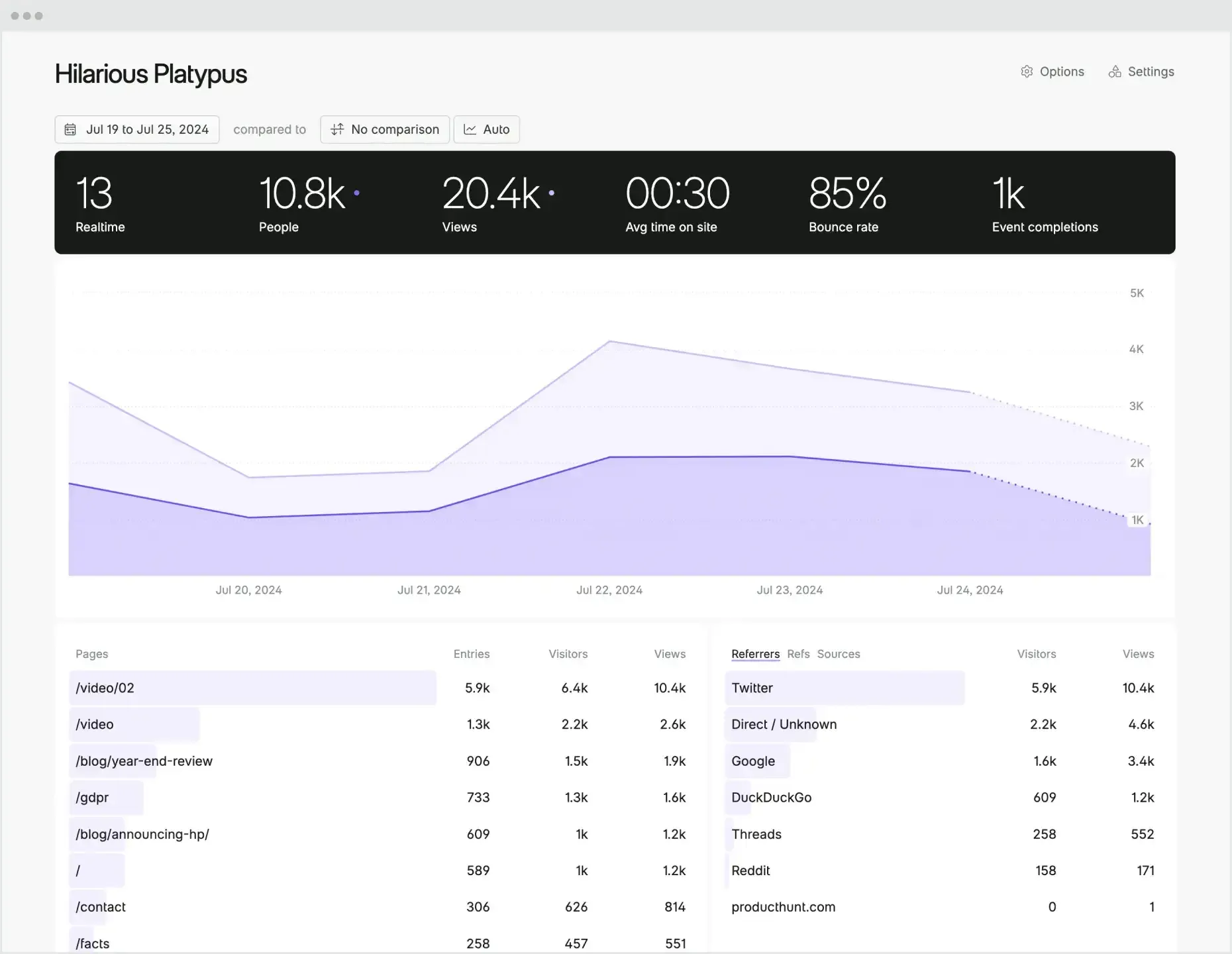
If you’re trying to track a long complex user journey over months that finally ends in a sale then you need Google Analytics or similar. If your needs are more along the line of how many people, how did they get here, what did they look at and what are they using to access the website then Fathom covers all that efficiently and without transferring any personally identifiable information.
You can self-host analytics tools but the overhead of doing so is rarely worth it when tools like Fathom are available for $150/annum and offer features such as the ability to share or embed a dashboard with the client and an API.
What about native apps?
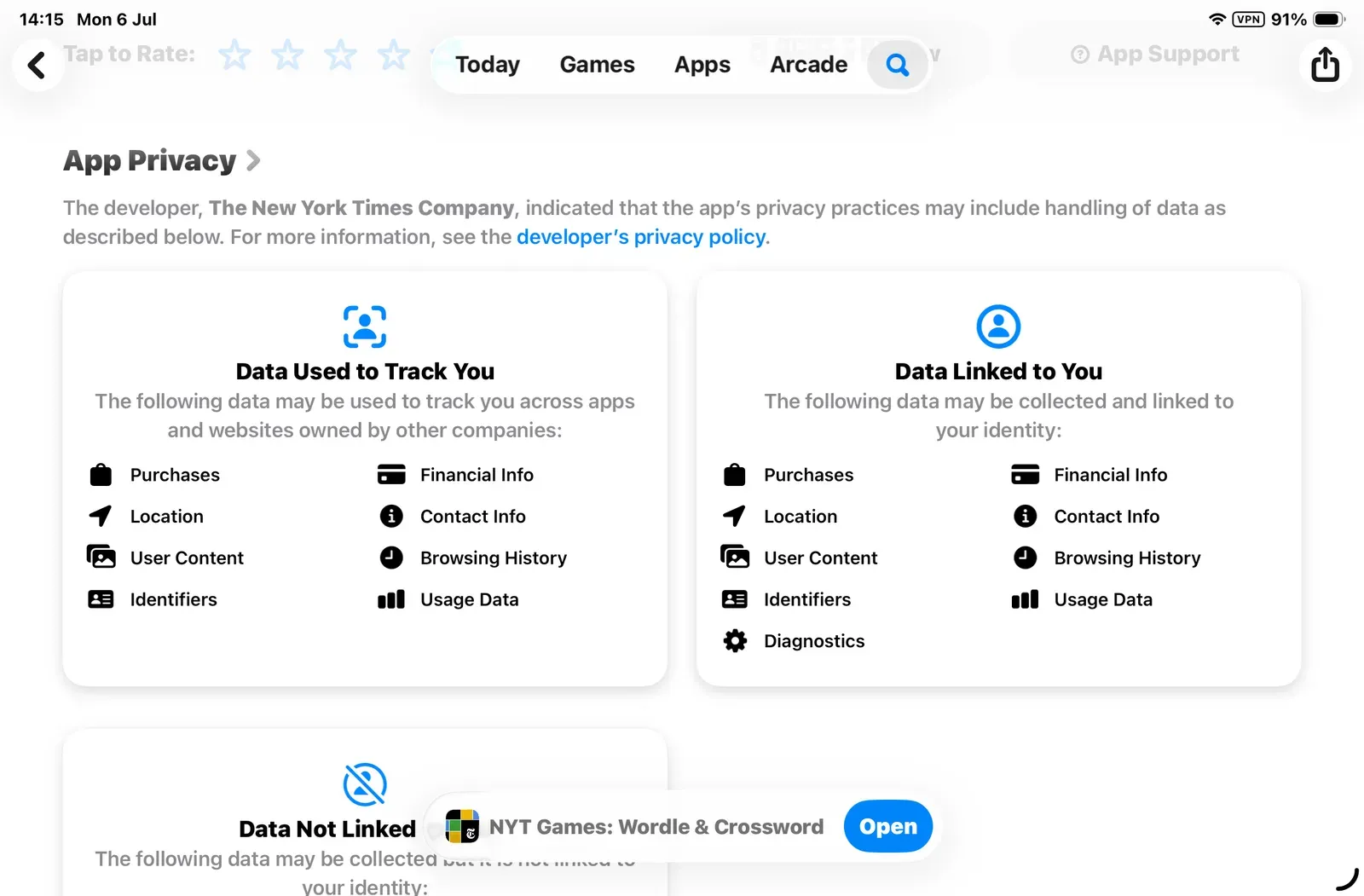
I opened my New York Times crossword app on my phone the other day and had to renew the cookies at which point I was informed that I was consenting to sharing my data with 366 partners. That sounds scary and it also sounds really inefficient, but it happens because of a cascade effect. A game with as many millions of customers as the NYT will experience a lot of edge cases and scaling issues. So the developer team needs good insights into bugs and details of the hardware these bugs occur on. Advertisers and the growth team also want to know how effective their work is as well. Crosswords and word games can be big business! As industry standard monitoring tools are added to the games then those tools in turn have third-parties connected to them and so the cascade goes on.
That’s how you end up with this kind of scenario. Some of it is necessary and helpful, but much of it is about profiling you for advertisers. You may be able to choose a simpler, more privacy focussed business model that collects what is necessary to diagnose problems, but don’t see your paying customer as an asset to be silently targeted by ads elsewhere.
So are there alternatives? Is there a happy-medium?
We believe that Aptabase (especially for mobile apps) strikes a good balance of error reporting and usage tracking for UX improvements without getting into tracking people across different apps and linking data to profile them.
Aptabase • Analytics for Mobile
AI powered search and MCP servers
Users have more and more expectation of a chat-like natural language search experience rather than traditional keyword matching. Depending on how this is implemented your users’ searches may be sent to a 3rd party for processing before returning that natural language response. You’ll have to look at this on a case-by-case basis as there are so many services and models out there. Running your own local model is viable, but that does change the hosting needs of a project as the kind of processing done by LLMs won’t sit well on a CPU that’s perfectly capable of hosting your website.
One grey area is MCP servers. We’re building an MCP server for a client website so that people don’t even have to visit the website to get information from it. That means that people will be able to add our client’s website to Claude or ChatGPT as a reference source and ask questions directly from their preferred chat. Other AIs will be able to discover this interface and do the same.
Now from our side, we have the ability to filter out what we return as a response and it’s a public service i.e. there’s no need to log in to use it so we have no information on who is asking questions of the website and more importantly, what they are asking of it. But the AI that the questioner is using takes their question, queries the website for information and then transforms the response into some kind of human readable answer, perhaps formatting, grouping and reordering the information to the user’s needs. What that AI is storing about the user’s habits is the question.
Convenient sharing
Our approach to privacy has been only collect what you need for a site or app to function well. In a recent project we tested how far we could push that. The ultimate in privacy is building tools that you don’t install and which work with your data on your machine, never leaving your machine and never being transferred over the internet.
We recently built a set of tools for helping people with simple mapping tasks. We walked the talk and a key feature is a focus on privacy. If a tool could run locally on the user’s machine, in the browser, with no need to upload a file for processing on our servers, that was the option we chose.
Because only one of the mini-tools actually processes info online this puts very little resource load on our servers. This is partly how we are able to offer it for free to organisations that do public good in Scotland. As it’s a free tool, gated to a specific set of people we did build in a standard registration process where we ask for their email, name and organisation. The tool in question was a route builder and as the data for the route was being built on the server rather than the user’s computer we took that as an opportunity to let the user save their route in the database and share it with others in their organisation. It’s a simple convenience that means a group of people can access the same route and work on it together rather than pushing files around by email.
Privacy really can be a win-win for everyone and by designing with privacy as the starting point we created a set of useful tools where 7 out of the 8 tools work entirely locally on the user’s computer, never transferring their data out of the building.
The link contained in this article to Fathom Analytics is an affiliate link which means that you will get a discount on signing up and we will get a 25% recommendation fee. But we use them and they’re great. We don’t recommend things we don’t use ourselves.